1. When Reporting Requests Started to Scale
1.1 Two weeks for a font change...
A technician finishes a job. The back office user needs the report to issue an invoice. The report has the wrong font, and back office user feedback to CS. To fix it, CS raises a ticket. PM writes a spec. Designer updates Figma. Engineering modifies the report template. QC tests. Two weeks later — new font.
That was our process. For every change. No matter how small.
When I joined, one module kept showing up in the tickets more than any other: the service report. Not just from new clients getting set up — but from existing ones, coming back repeatedly. A font tweak here, a field adjustment there. The same tenants, the same module, month after month.
That worked until we onboarded an enterprise client in an industry we already knew well. The original template had been built for that exact sector. But this tenant was an outlier, they needed multiple report formats by job type, something the architecture didn't support at all. This wasn't a nice-to-have. It was a large contract, and delivering was non-negotiable. For the first time, the system wasn't just slow — it was a blocker on a must-win deal
1.2 Why service report matters?
The service report isn't just an output — it's how a field service company proves the work was done. It triggers the invoice, satisfies compliance, and goes directly to the client the moment a job closes. Getting it wrong isn't a minor inconvenience — it affects billing, reputation, and in regulated industries, legal standing.
The service report is a universal module — every tenant relies on it regardless of industry, size, or maturity stage.
2. Early Signals of Friction
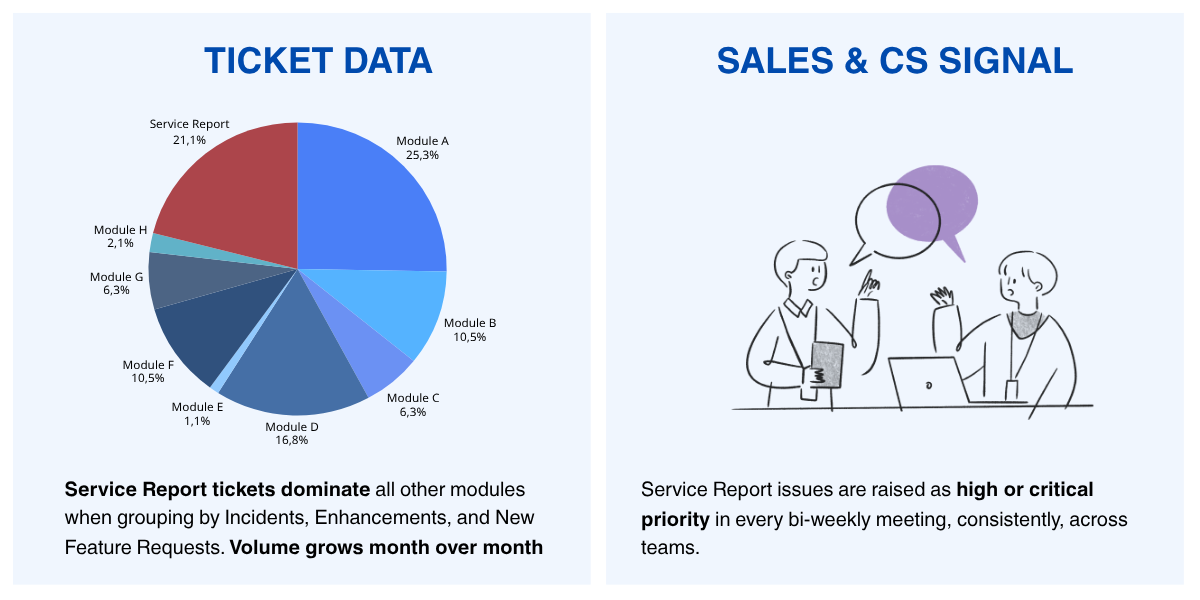
Across ticket data and interviews with the customer-facing team (CS and Sales), two patterns stood out:
- Service Report is our highest-friction module, when comparing with other modules (High tiket)
- More importantly, almost all new customers require customization for the reports.
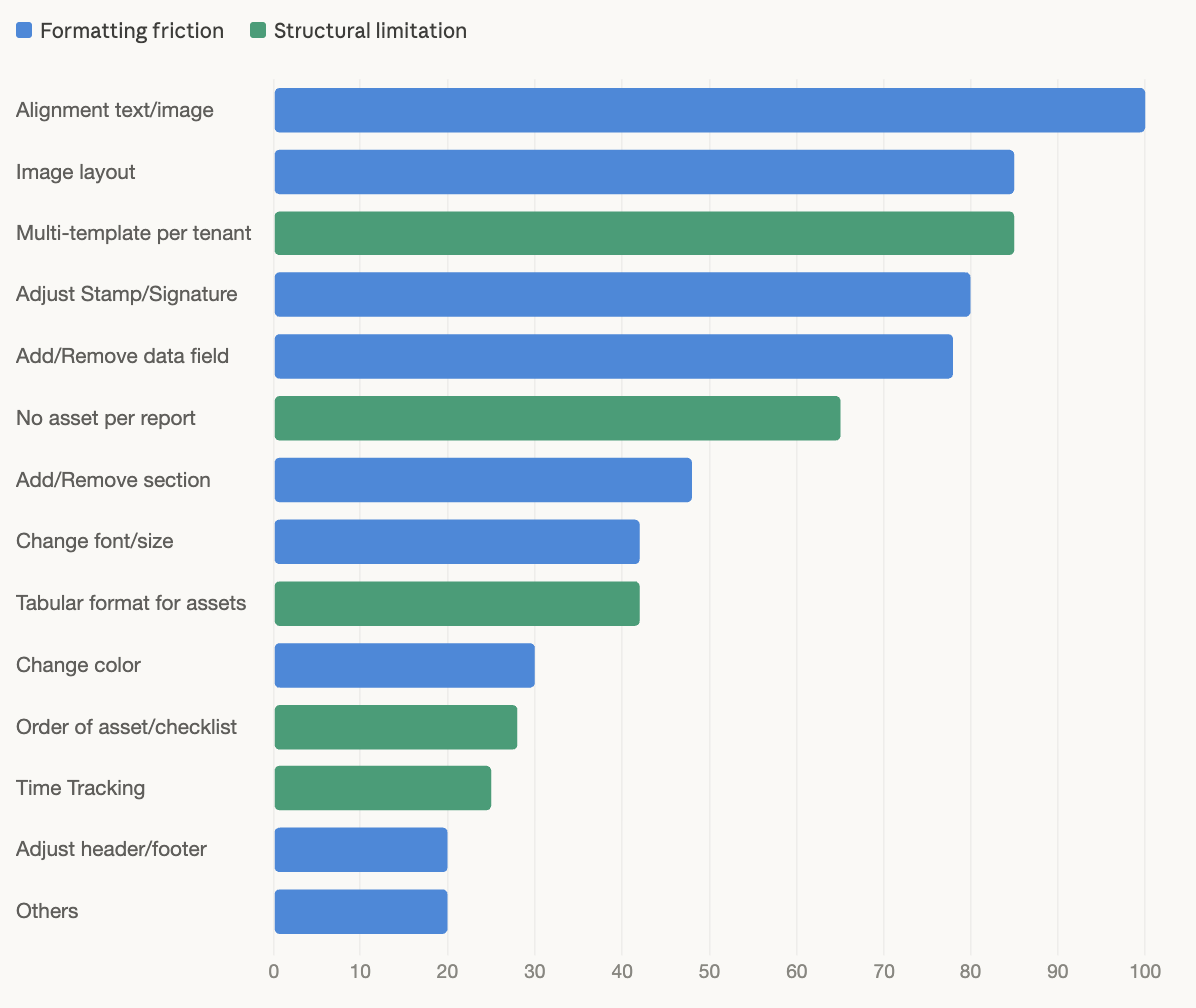
Breakdown of tickets in Service Report module:
- Repeat requests: tenants return for the same formatting change multiple times (font size, color, alignment, layout). Individually small, but each one still went through the full development cycle — eroding client trust over time.
- System limitations: requests the system simply couldn't fulfill, such as multiple templates per tenant, tabular layouts for large asset lists, or reports without assets. These had no workaround. Complete blockers.
3. Problem Validation
Determine whether the signal represents a real product problem.
I investigated across three angles: the internal workflow, the business impact, and the scaling risk.
3.1 Operational friction
Where does delay or inefficiency occur? — via internal stakeholder interviews and process mapping.
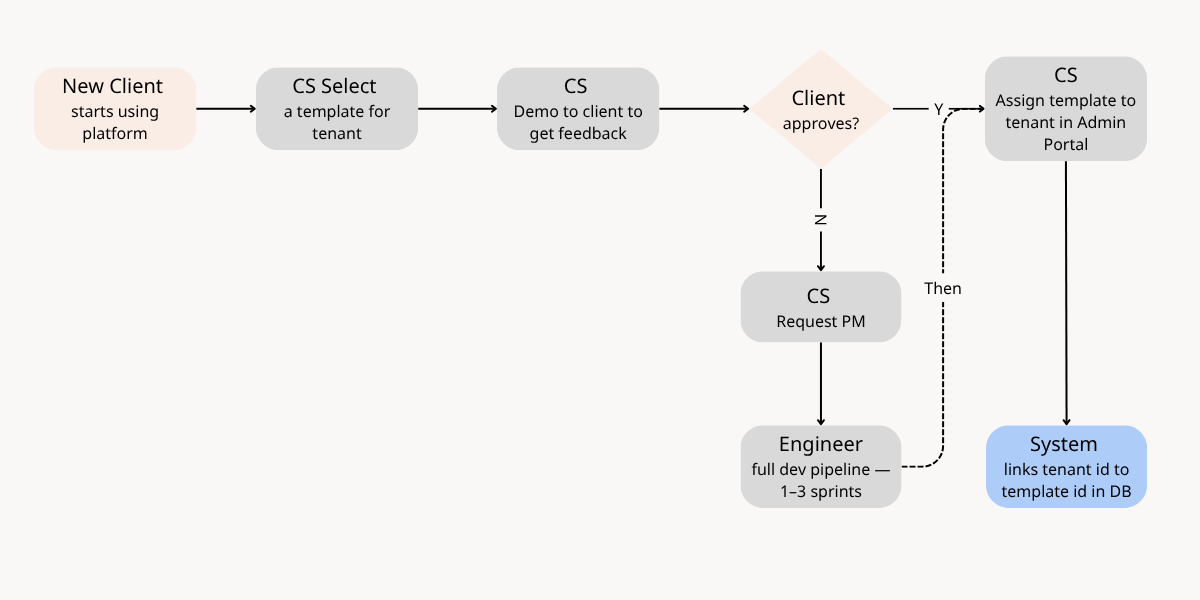
Our product managed report templates for all tenants and stored them in the database. Every change (no matter how small) required a full development process:
- Clients could not make changes on their own. They had to request through CS, which then transferred to the PM.
- PM needed to review and define detailed requirements before anything could move forward.
- Designer had to be involved to keep the design source of truth in sync for each template.
- For major changes, the client needed to review and approve the design before development could start.
- Engineering had to discuss with PM and Designer to implement correctly.
- QC needed to test (sometimes run the full pipeline if the change happens in shared template) before release.
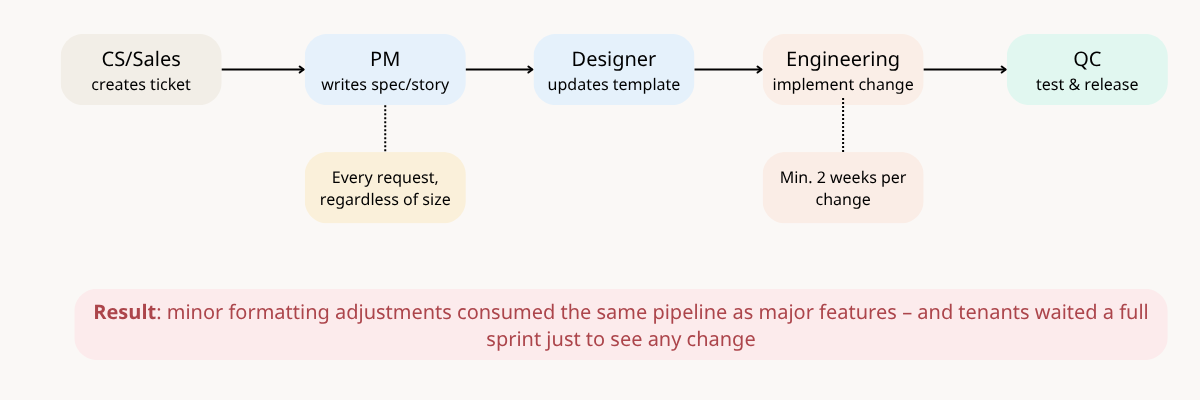
The process behind every tenant request
The result: 1–3 sprints for every request, regardless of whether it was a font change or a major update.
3.2 Business impact
How long do requests take, and what happens when the report is wrong or delayed? — via cycle time analysis and impact analysis.
For existing clients:
- They waited 1–3 sprints to see any change in their reports.
- The result was sometimes not as expected (because the request passed through multiple interpretations) which meant they had to request again.
- Delays affected their billing process and on-site service record tracking.
- Repeated delays reduced customer satisfaction, which led to delays in contract renewal discussions with some tenants.
For new clients (prospects and trials):
- They often evaluated the service report before exploring the full platform.
- Many came from other systems with existing templates their customers were already familiar with. BUT our product could not match that customization.
- For some industries like elevator and escalator maintenance, they could adapt to our template. BUT it still required significant updates from our side.
- For regulated industries like medical, our template was not accepted at all, AND we lost those customers.
The service report was often the first thing prospects evaluated — and the thing existing clients never stopped pushing to get right. Both put revenue at risk.
3.3 Scaling risk
Does the process break as the number of tenants grows? — via operational cost analysis.
- Not all tenants had their own template. Many shared a default one at onboarding, but over time, they would come back requesting changes, which then required creating a new template for them instead of editing the shared one.
- More tenants meant more templates to build and maintain — all living on the engineering side, all requiring engineers to touch them when something changed.
- When issues occurred in production, there might not have no single source of truth (fragmented template management). Then CS would ask, and PM had to spend significant time investigating.
Maintaining templates for all tenants required CS, PM, Designer, Engineering, and QC.
4. What Tenants Were Actually Telling Us
The ticket data showed the pattern. But I needed to understand why it mattered so much to tenants. I did two things:
- Talked to CS and directly to tenants to understand what they actually needed from their reports and where the current system fell short.
- Analyzed ~100 reports across existing tenants, prospects, and trials to see how different their formats were from what our system could produce. What I found: around 90% of tenants came to us already using their own report formats. Their end customers were familiar with those formats, and in many cases, the format was not something they could compromise on.
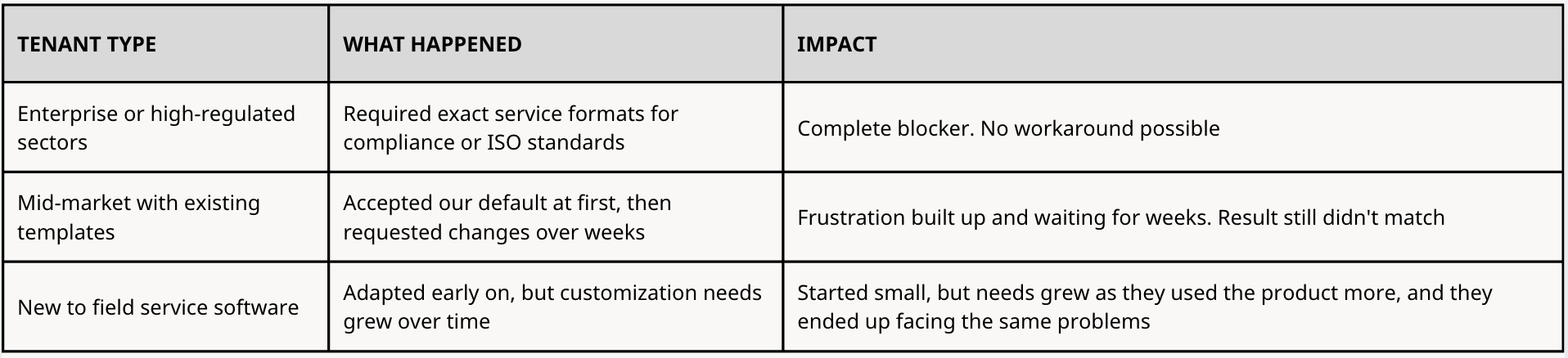
Beyond formatting, I also uncovered a need that did not show up in ticket data:
Version control. Back-office teams often edited reports after a technician completed a job — adjusting details before sending to the client. But the system only showed the latest version. They had no way to track previous versions for document control.
5. Problem Statement
Tenants, especially those in specialized or regulated industries, could not get service reports that matched their current operational requirements.
Formatting changes like font, color, or layout took 1–3 sprints to deliver. Structural needs like multiple templates per tenant, tabular format for large numbers of assets, or reports without assets were not supported at all.
The bottleneck wasn't the team. It was the architecture. Every report format was hardcoded in XML, a file only engineers could modify. Every change, no matter how small, required the full team to be involved.
With each new tenant, the engineering workload grew at the same rate. There was no way to scale the business without scaling the team maintaining templates alongside it.
As the business planned to expand into new service sectors, this problem would only get worse.
6. Root Causes
To understand why every report change required engineering, I mapped how the system actually worked — from template setup to PDF generation.
Part 1 - How the report is generated
Our system manages all tenants' templates in our database. If tenants share similar needs, they will use the same template; otherwise, we will create a new template for them
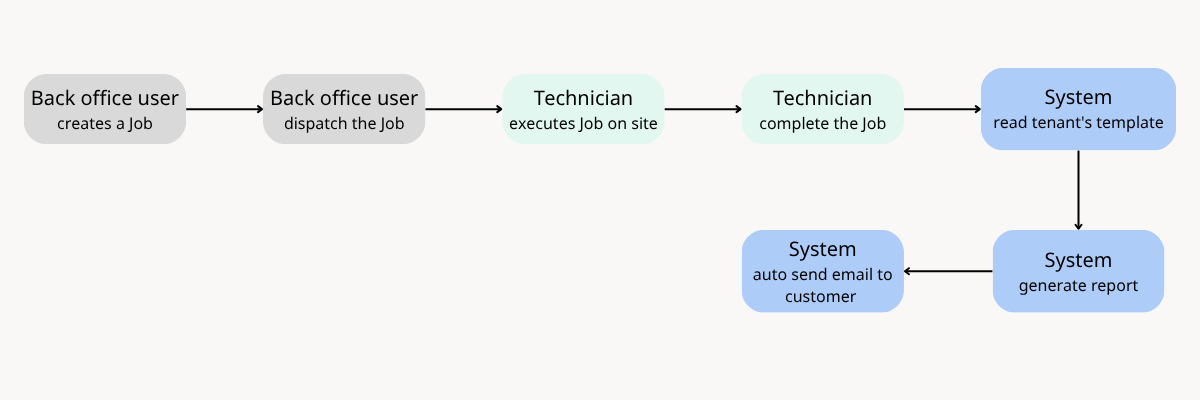
For each completed job, the system reads the template assigned to the tenant and generates a report using that template.
Part 2 - How the system was architected
The template was designed based on an initial understanding of a few service sectors. Each template had pre-defined components (sections, data fields, and layout) all encoded in a specific format.
These layout and data rules were translated into XML. The system stored one XML file per template, and each tenant was associated with exactly one template.
- Tenant A --> XML Template A
- Tenant B --> XML Template B
- Tenant C --> XML Template A (shared)
- Tenant D --> XML Template C
When a job was completed, the system identified the tenant, populated the XML template with data from the job record, converted it into a PDF, and automatically sent it to the client.
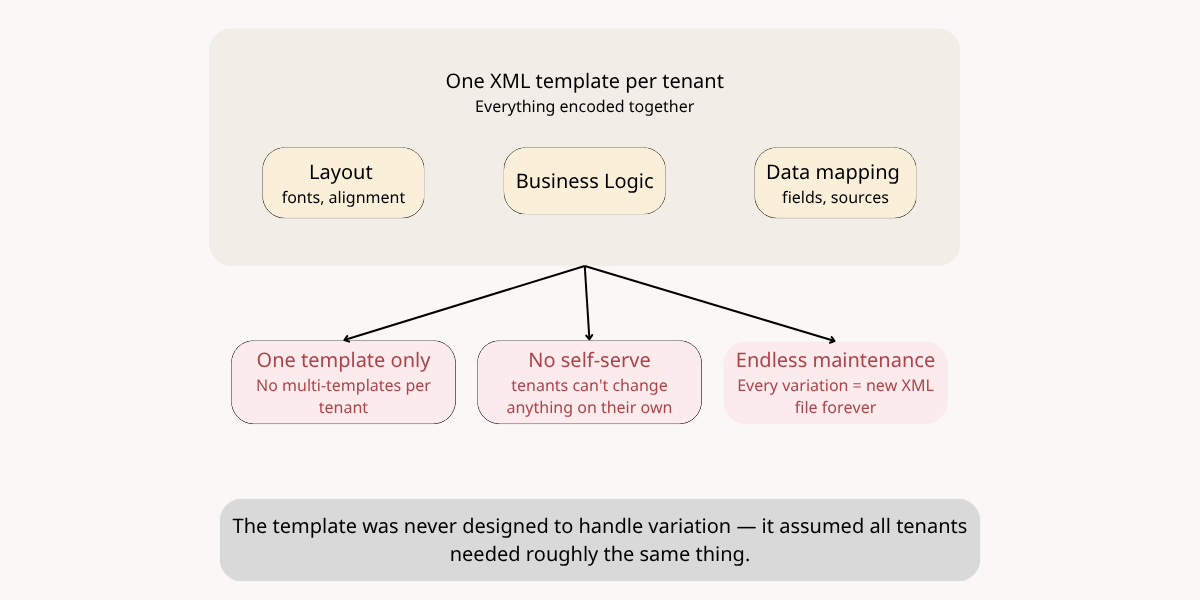
In summary, the diagram maps the root cause to the issues surfaced above.